Home Assistant dashboard: Latest news

Here you find a Home Assistant dashboard example showing how you can scrape and show the latest news on your dashboard.
News headline (nu.nl)
Show the most important news headline.
With clickable arrows to open the news site.
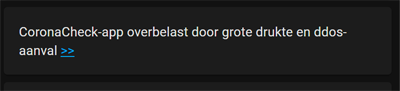
Get every 15 minutes the latest news headline from the news site nu.nl.
For other sites, check my Web Scraper page how to show website content (like news) inside your dashboard.
Add the news site scraper with the internal Home Assistant Scrape integration

Most fields can be skipped, only these are required.
The default scrape interval time is 600 seconds (5 minutes). I couldn’t find an override in the UI config.
| Field | Value | Tab |
|---|---|---|
| Resource | https://www.nu.nl | 1 |
| Name | nu.nl headline | 2 |
| Select | .title.fluid:first-of-type |
2 |
Or add it manually via the configuration.yaml.
Here you can override the scan interval time.
# Sourcecode by vdbrink.github.io
# configuration.yaml
- platform: scrape
  resource: https://www.nu.nl
  select: ".title.fluid:first-of-type"
  name: "nu.nl headline"
  scan_interval: 900
Use a Markdown card to present the news on the dashboard.
# Sourcecode by vdbrink.github.io
# Dashboard card code
 - type: markdown
        content: |
          {{ states('sensor.nu_nl_headline') }} [>>](http://nu.nl)
Now every 15 minutes you see the latest news refreshing on your dashboard!
« See also my other Home Assistant tips and tricks
^^ Top | Homepage | Best Buy Tips | Automation Ideas | Blog posts | Sitemap