Home Assistant dashboard: Frigate

 Frigate is a tool to analyze your video camera streams.
It can detect and store a snapshot and a video clip when it detects presence.
On this page, you can find how to add video streams on your dashboard.
Website: https://frigate.video/
Table of Contents
- Frigate configuration
- Show live RTSP streams
- Show MP4 video clips
- Show Frigate MQTT last event captured snapshots
- Frigate iframe
- Front door detection mode
Frigate configuration
This is the camera section from my Frigate configuration.
Based on a Reolink camera. A mini pc with Intel Arc Graphics GPU.
- 5 days non-stop recordings
- Person detection active
- Send an MQTT event when a person is detected
...
cameras:
  camera_1:
    ffmpeg:
      hwaccel_args:
        - -c:v:1
        - h264_v4l2m2m
      inputs:
        - path:
            rtsp://username:password@192.168.x.x:554/h264Preview_01_main
          roles:
            - record
            - detect
    detect:
      width: 1280
      height: 720
    snapshots:
      enabled: true
    record:
      enabled: true
      continuous:
        days: 5
      motion:
        days: 0
    mqtt:
      timestamp: true
      quality: 100
      bounding_box: false
    motion:
      mask:
        - 0.497,0.598,0.428,0,1,0,0,0,0,1,0.181,1,0.832,1,0.791,0,1,0,1,1,1,1,0.117,1,0.386,0.664
        - 0.016,0.314,0.405,0.283,0.418,0.433,0.01,0.503
    objects:
      track:
        - person
      filters:
        person:
          min_area: 5000
          max_area: 1000000
          threshold: 0.80
          min_score: 0.8
          mask:
            0.671,0,0.631,0,1,0,0,0,0,1,0.181,1,0.832,1,0.666,0,1,0,1,1,1,1,0.318,1,0.457,0.514,0.529,0.136
...
Show live RTSP streams
You can add a direct livestream based on the rtsp url with the custom HACS integration WebRTC.
Repo: https://github.com/AlexxIT/WebRTC
There are a lot of possible settings, check this site for them.
Install this integration, via this button, into your own Home Assistant instance.

# Dashboard card code
type: custom:webrtc-camera
url: rtsp://username:password@<ip-address:port>/h264Preview_01_main
Show MP4 video clips
Frigate provides for each event an MP4 movie via the api.
- Api format: http://
/ /clip.mp4 - Api example: http://192.168.1.2:5000/api/camera_1/person/clip.mp4
With some HTML you can include the video on your dashboard.
This doesn’t work with the default Markdown integration, but it works with the custom HACS integration Lovelace HTML card.
Repo: https://github.com/PiotrMachowski/lovelace-html-card
Install this integration, via this button, into your own Home Assistant instance.
# Dashboard card code
type: custom:html-card
content: |
  <center>
   <video width="450" height="260" autoplay loop muted playsinline controls> class="video-js" data-setup="{}">
    <source src="http://<ip-address:port>/api/camera_1/person/clip.mp4" type="video/mp4">
   </video>
  </center>
Or show only a snapshot image from Frigate.
action: browser_mod.popup
data:
  size: fullscreen
  title: Camera
  content:
    type: picture-entity
    entity: camera.camera_name
    camera_view: live
    show_state: false
    show_name: false
Show Frigate MQTT last event captured snapshots
When you’ve added your camera as camera-entity in Home Assistant you can use the Picture Entity to show the last captured snapshot.
This example redirects also to the page /my-camera/frigate when you click on it.
# Dashboard card code
type: picture-entity
show_state: false
show_name: false
camera_view: auto
fit_mode: cover
tap_action:
    action: navigate
    navigation_path: /my-camera/frigate
entity: camera.frigate_last_person
Frigate iframe
To show the Frigate dashboard inside Home Assistant.
Create a new tab with as layout Panel (single card) and name it frigate.
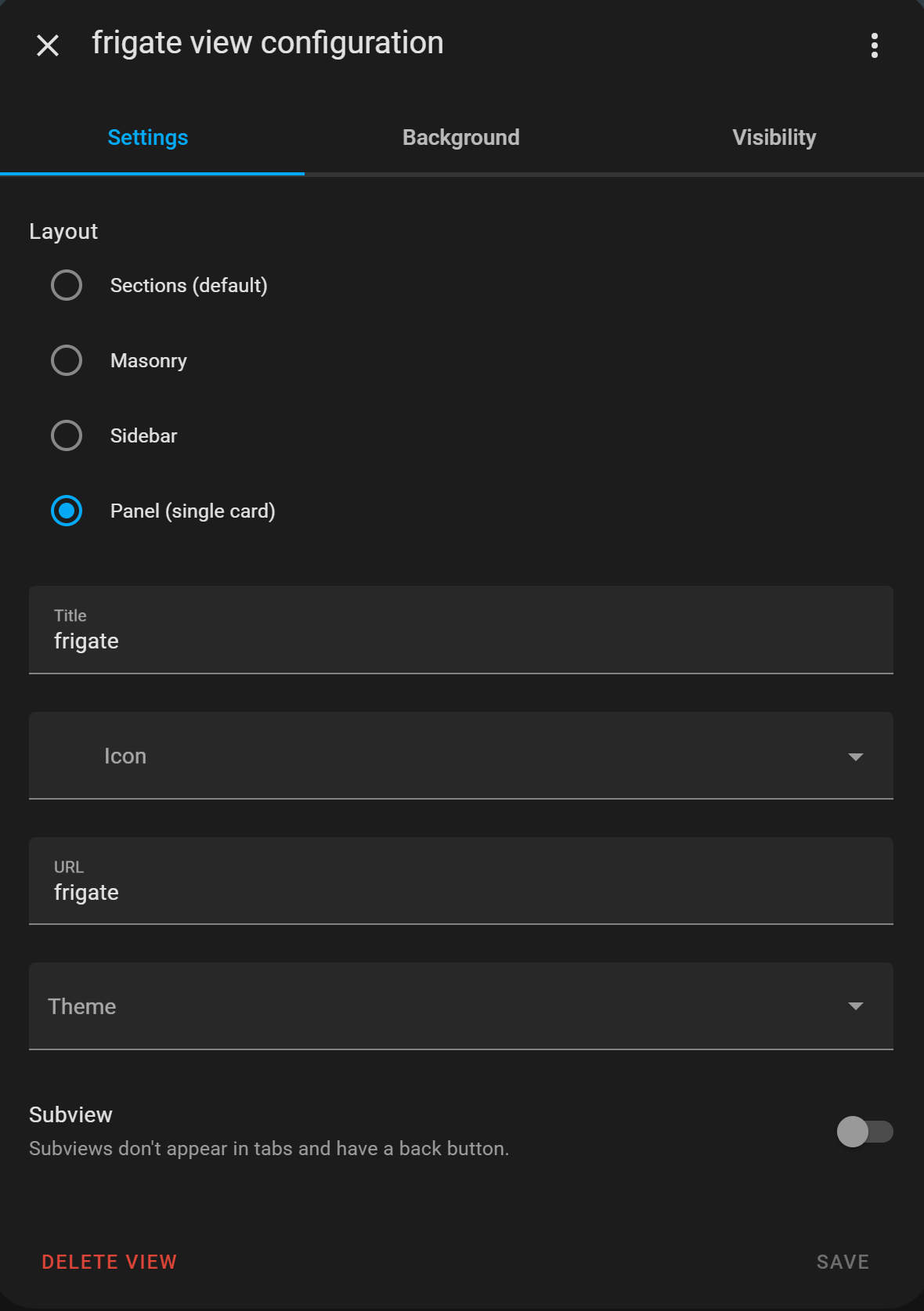
Click on the right bottom button Add card and select the Webpage card and paste this content:
type: iframe
aspect_ratio: 100%
url: http://x.x.x.x:5000
Front door detection mode
I use Node-RED to set the Home Assistant input boolean input_boolean.frontdoor_detection_mode to true when Frigate detects a person at the front door.
I use the MQTT topic frigate/camera_1/person/snapshot where Frigate publishes the last snapshot of a person detection.
Then use the Home Assistant Api Node.
Path: states/input_boolean.frontdoor_detection_mode is an input boolean in Home Assistant that you can use to enable or disable the frontdoor detection mode.
Data: {"state":"on"}
« See also my other Home Assistant tips and tricks
^^ Top | Homepage | Best Buy Tips | Automation Ideas | Blog posts | Sitemap