Home Assistant dashboard:
Fullscreen camera stream
when a person is detected
 I have a tablet dashboard in my living room where I show weather, news and actual home data.
I wanted to show a full screen live stream of my front door when someone is detected entering my front door.
I have already Frigate installed to recognize a person and not get triggered when a cat walks by in my front yard.
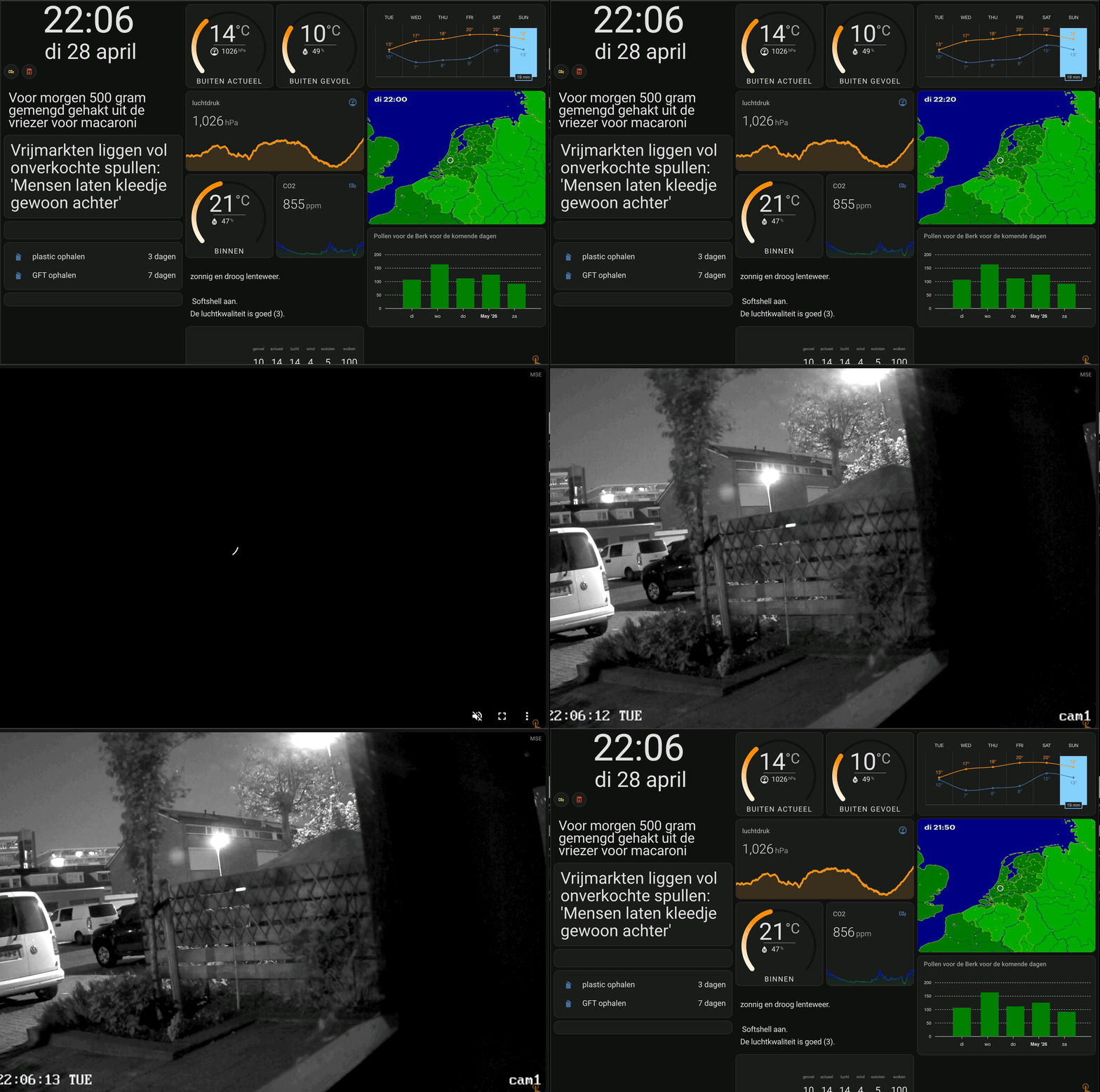 Opening the fullscreen popup camera stream in action.
Table of Contents
Multiple solutions
There are multiple solutions to achieve this. I will explain the one I use myself via the extra HACS module browser_mod.
Another popular solution is via the extra HACS card Bubble Card, this supports also a fullscreen popup feature. I added a link to a video on how to implement this alternative solution if you want to try it.
Fullscreen popup with browser_mod
To use the browser_mod solution, the extra HACS module browser_mod 2 is required.
Install this integration, via this button, into your own Home Assistant instance.

Also, the HACS module WebRTC is required to show the camera stream in the popup, this module supports RTSP streams and converts them to WebRTC streams which can be shown in the popup.
Install this WebRTC integration, via this button, into your own Home Assistant instance.
You also need to create two automations, one to show the popup when a person is detected and one to hide the popup when no person is detected anymore. It will show the popup on all your dashboards.
Automation: Show popup
Create an automation that triggers when a person is detected and shows the popup with the camera stream.
In my case I have a Node-RED automation which set the input_boolean.frontdoor_detection_mode to on when a person is detected and set to off after a delay once no person is detected anymore.

# Sourcecode by vdbrink.github.io
# Automation
alias: Frontdoor Popup on Detection
triggers:
  - entity_id: input_boolean.frontdoor_detection_mode
    to: "on"
    trigger: state
actions:
  - data:
      size: fullscreen
      content:
        type: custom:webrtc-camera
        url: >-
          rtsp://username:password@192.168.x.x:554/h264Preview_01_main
        muted: true
        autoplay: true
    action: browser_mod.popup
NOTE: The properties
muted: trueandautoplay: trueare optional in case the stream doesn’t always start.
Automation: Hide popup
Create a second automation to hide the popup when no person is detected anymore.
In my case I have an automation (in Node-RED) that sets the input_boolean.frontdoor_detection_mode to off after a delay once a person was detected.
# Sourcecode by vdbrink.github.io
# Automation
alias: Close Frontdoor Popup
triggers:
  - entity_id: input_boolean.frontdoor_detection_mode
    to: "off"
    trigger: state
actions:
  - action: browser_mod.close_popup
FAQ
Q: Can I also auto hide the popup after a fixed time?
A: Yes, that’s also possible with the property timeout under the data tag, you can set a timeout in milliseconds after which the popup will automatically close.
Q: Can I restrict the popup to only show on a specific dashboard/browser?
A: Yes, you can add the property browser_id: under the data tag to define a single browser to show the popup on, instead of all browsers.
In Browser Mod 2.x this property is called browser_id; the older Browser Mod v1 used deviceID instead, which no longer works in 2.x.
The browser_id can be found in the browser_mod integration page.
Click on this button to open your Browser mod integration page

...
actions:
  - data:
      browser_id:
          - browser_mod_0c68c302_d198f995
      size: fullscreen
      ...
Q: Which parameters can I use in the popup?
A: You can use many parameters for browser_mod.popup, take a look at the documentation for the full list of all browser_mod popup parameters.
Fullscreen popup with Bubble Card
There is also an alternative solution to show a fullscreen popup with the HACS Bubble Card.
Install this integration, via this button, into your own Home Assistant instance.
In this video you can see how to implement the fullscreen popup with the Bubble Card.
Click to start the YouTube video
^^ Top | Homepage | Best Buy Tips | Automation Ideas | Blog posts | Sitemap