Home office: Virtual design with AI
To make my idea more realistic, I created a virtual design by used Gemini AI to convert a photo of the old room situation to how this room could look like based on my mood board. I uploaded the photo and entered prompts like this:
- “Remove all the items from the room”
- “Add a walnut floor”
- “Make the back wall dark green”
- “Add walnut acoustic panels to the wall”
- “Add a full room width desk with a walnut top and place a wide screen monitor with keyboard on it”
- “Add two floating planks to the back wall and put small plants on it”
It generated a photo how it could like:
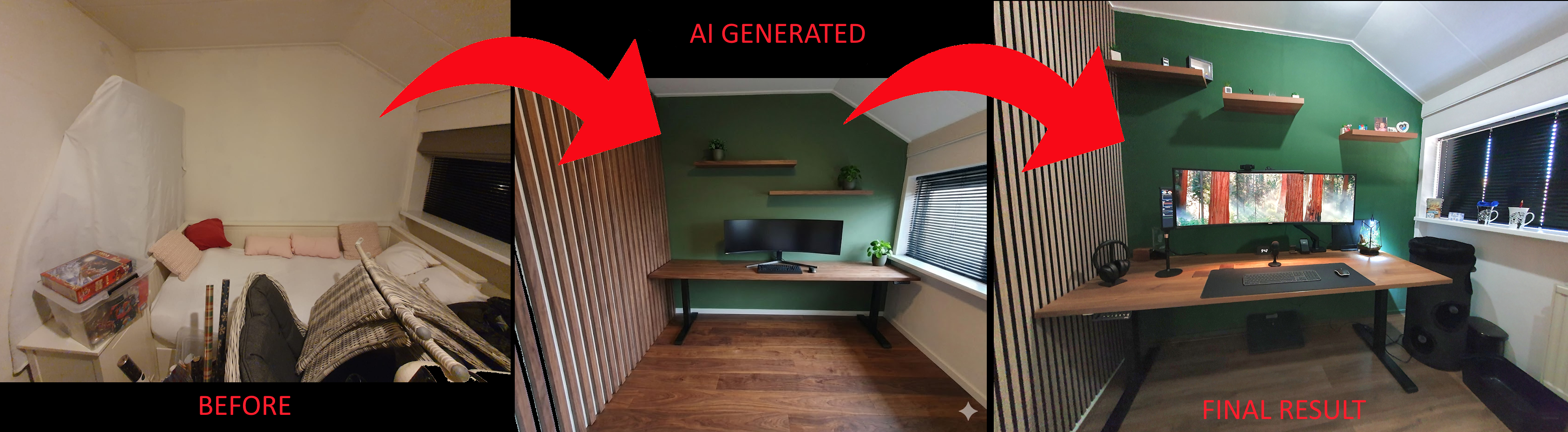
Use AI to convert a real room photo to how it could look like. That’s a big difference!
You can fine tune your prompt by switching wall design or ask to add more details. Or upload photos from your mood board and ask to apply elements from these photos to your photo. Or ask for a few alternative designs to get more examples of how it could look like when you realize your idea.
For AI, it’s sometimes hard to scale elements, on the generated photo, to the right sizes. It’s good to measure yourself also if they fit correct and match reality.
Overview | Mood board | Virtual design with AI | Room Decoration | Desk setup hardware | Accessories
^^ Top | Homepage | Best Buy Tips | Automation Ideas | Blog posts